Split Your Class Into Groups in 30 Seconds: A Teacher's Time-Saving Trick
I used to waste 5-7 minutes forming student groups. Now it takes 30 seconds. Here's how random group generators transformed my collaborative activities and saved precious class time.
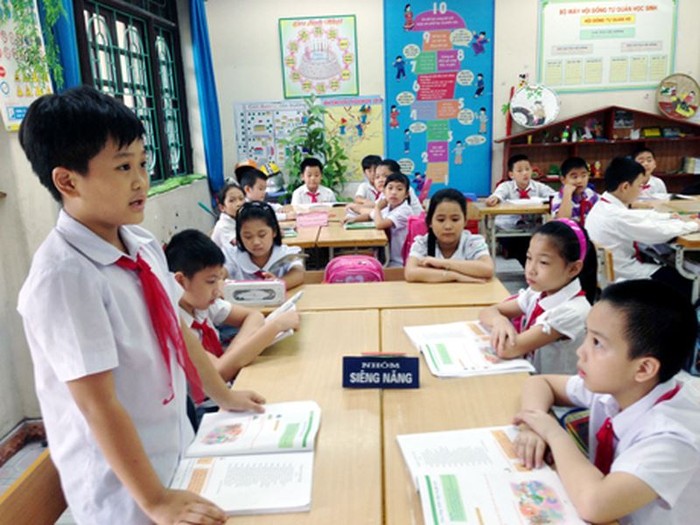
'Okay class, let's form groups. Group 1 will be...' Five minutes later, I'm still sorting students. Someone didn't hear their group. Someone's arguing they don't want to work with their assigned partner. Someone's wandering around lost. Collaborative learning is powerful—but group formation was killing my precious class time. Then I discovered random group generators, and everything changed.
The Problem With Traditional Group Formation
Before I found a better method, every group activity started with chaos:
- •Time drain: 5-7 minutes just to form groups in a 45-minute period
- •Student self-selection: Friend groups cluster together, creating unbalanced skill levels
- •Confusion: 'What group am I in?' 'Who's our leader?'
- •Arguments: 'I don't want to work with them'
- •Same patterns: Same students working together all year, never mixing
- •Social anxiety: Quiet students left out as last picks
I started avoiding group work entirely because the setup was too exhausting. But group activities are valuable—I needed a better system, not avoidance.
The 30-Second Solution: Random Group Generators
A random group generator is a digital tool that instantly divides a class list into equal groups. You input student names, specify group size, click a button—done. Projected on the board, everyone sees their assignment simultaneously.
The key is RANDOMNESS. When a computer assigns groups, there's no favoritism to argue about, no social dynamics to navigate, no 'why am I with them?' because the answer is simply: the computer chose randomly.
How It Changed My Classroom
Before: The Old Chaos
'Let's do a group activity.' Internal groan. Students start lobbying: 'Can I be with Sarah?' I start calling names, students don't hear, chaos ensues. By the time groups are formed, energy is gone, and we've lost 15% of class time.
After: The New Flow
'Let's do a group activity.' I click one button. Groups appear on the projector. Students look up, see their names, move to their assigned areas. 30 seconds, done. We dive into the actual learning.
The Unexpected Benefits
Beyond saving time, random group assignment created positive changes I didn't anticipate:
1. Social Mixing
Students who never interact suddenly work together. Friendships formed across social boundaries. The classroom felt more unified.
2. Reduced Drama
No one can blame me for unfair groupings. 'The computer decided' ends arguments instantly. Students accept randomness more easily than teacher choices.
3. Balanced Groups
Self-selected groups create skill imbalances. Random groups distribute talent more evenly. Strong students can't cluster; struggling students aren't isolated.
4. Preparation Habit
Students know they might work with anyone. They can't rely on a capable friend to carry them. Accountability increased.
5. More Group Activities
Since setup became painless, I now do collaborative activities more often. More practice with teamwork skills.
How to Implement Random Groups
Step 1: Choose Your Tool
- •Sorokid's group divider: Built for classrooms, saves class lists
- •Random Team Generator websites: Many free options available
- •Google Sheets formulas: For tech-savvy teachers, RAND() functions work
- •Apps like Flippity: Integrates with Google Sheets
Step 2: Prepare Your Class List
Enter all student names into the tool once at the start of the year. Some tools save class lists so you don't repeat this step.
Step 3: Set Expectations
Explain to students:
- •Groups will be random—no exceptions
- •This is fair because everyone gets random partners
- •You'll work with everyone eventually—that's a life skill
- •Complaining about assignments wastes everyone's time
Step 4: Project and Go
Display the generated groups on the projector. Students see their names, move immediately. No reading names aloud, no confusion.
Advanced Tips
Assigned Seats in Groups
Have designated areas for each group number. 'Group 1 is the back left table, Group 2 is center...' Students move immediately without asking where to go.
Roles Within Groups
Randomize roles too: 'First person alphabetically is note-taker, last person presents.' Removes arguments about who does what.
Strategic Non-Randomness
Sometimes you need intentional groupings (mixing skill levels, separating problematic pairs). Most tools let you exclude certain combinations or manually adjust after randomization.
Handling Pushback
'I don't want to work with [student]'
'I understand. In life, we work with people we didn't choose—jobs, projects, committees. This is practice. You can do 20 minutes.' Usually, they surprise themselves.
'That's not fair, my friend got a good group'
'The computer is completely fair—it has no opinions. Next time, groups will be different. That's the fairness: everyone gets different partners over time.'
Genuine Issues
If there's a serious conflict between students (bullying, safety), override the randomizer quietly and discreetly. Student wellbeing comes first.
The Math: Time Savings
Let's calculate:
- •Old method: 5-7 minutes per group activity
- •New method: 30 seconds per group activity
- •Savings: ~5 minutes per activity
- •If you do 2 group activities per week: 10 minutes saved weekly
- •Over 36 school weeks: 6 HOURS saved annually
- •That's 6 hours of additional instruction time recovered
Six hours might not sound like much, but it's equivalent to several full class periods. Every minute matters in education. Why waste any on logistics that a computer can handle instantly?
Different Group Sizes for Different Activities
| Activity Type | Recommended Size | Why |
|---|---|---|
| Quick discussions | Pairs (2) | Everyone must contribute |
| Problem-solving | Triads (3) | Two to discuss, one to record |
| Projects | Quads (4) | Enough hands, small enough for accountability |
| Debates/presentations | 5-6 | Diverse perspectives, shared workload |
The best classroom tools solve administrative problems so you can focus on teaching. A random group generator is exactly that: it eliminates 5 minutes of chaos with 30 seconds of technology. If you're not using one, you're working harder than necessary.
Stop wasting class time on group formation. Sorokid offers a free group divider tool that creates balanced student teams in seconds. Spend your 45 minutes teaching, not organizing.
Try Free Group Divider